


 HeardThat - Outstanding Life Assistant Freemium AI tool
 Navigating noisy environments often poses a unique challenge for individuals with hearing difficulties. HeardThat™ emerges as a game-changing solution that leverages state-of-the-art AI technology to make conversations more accessible and clearer for this demographic.
HeardThat™ takes advantage of AI algorithms to precisely separate and eliminate background noise. The primary focus is to enhance speech clarity, allowing users to easily follow conversations even in noisy surroundings.
HeardThat™ is designed to be compatible with existing hearing aids or earphones. Users need not invest in any additional devices to benefit from this app, making it an exceptionally convenient option.
The technology specifically targets the enhancement of speech signals, ensuring that dialogues or conversations are easier to comprehend. Whether you’re at a bustling café or a loud event, HeardThat™ makes it easier to focus on what is being said.
By integrating with smartphones and existing hearing devices, HeardThat™ presents itself as a cost-effective and convenient solution. It eliminates the necessity for new, expensive hearing devices, bringing an affordable alternative to the market.
HeardThat™ can be used in a variety of settings, be it during one-on-one conversations or even while watching TV. This adaptability makes it a must-have for anyone looking to improve their auditory experience across different platforms.
With a commitment to enhancing speech intelligibility, HeardThat™ aims to deliver a clearer, more comprehensible listening experience by reducing background noise. Users can engage more actively and comfortably in various social and communication settings.
 Leave a Comment

 CrystalSound - Outstanding Audio Editing Freemium AI tool
 In today’s interconnected world, where remote work and online communication are more prevalent than ever, CrystalSound emerges as a pioneering AI-powered noise cancellation platform. Designed to mitigate all forms of audio disturbance, CrystalSound guarantees an unparalleled communication experience.
CrystalSound utilizes real-time bidirectional noise removal to eliminate unwanted ambient noise during both outgoing and incoming calls. This feature ensures that not only can you hear others clearly, but they can also hear you in high-definition (HD) voice quality.
With CrystalSound’s Clarity Improvement feature, audio frequencies are amplified from 8kHz to 16kHz and from 16kHz to 32kHz, enhancing the audibility of the voice for the listener. This is particularly helpful for hearing subtleties and nuances in conversations.
The full-band model under CrystalSound’s HD Voice Enablement feature provides a noticeable boost in audio quality, giving the user the experience of HD Voice. The crispness and depth in audio deliverance stand unmatched.
CrystalSound’s Audio Loss Concealment automatically accounts for any missing audio caused by data loss during transmission within 5%. Users are thus safeguarded from intermittent disruptions in sound.
Whether it’s echo reverberating from the walls of an empty room or the voice echo during a call, CrystalSound’s Acoustic/Room Echo Suppression feature eliminates them all, ensuring that only your voice comes through.
Thanks to AI technology, CrystalSound enhances audio according to the user’s voice characteristics and environment. It adjusts settings dynamically to produce the most balanced, clear audio output possible.
The platform’s “My Voice Only” technology isolates your voice from any noisy background and other voices. This is invaluable for calls, podcasts, audio editing, transcriptions, and lectures.
Leave a Comment

 Loading...
 Metavoice Studio - Outstanding Audio Editing Freemium AI tool
 In an era where audio content is witnessing unprecedented growth, MetaVoice Studio stands out as a state-of-the-art AI voice-over platform that equips creators with the tools to produce studio-quality voice-overs effortlessly.
MetaVoice Studio specializes in integrating ultra-realistic, human-like voices into any creative endeavor. These lifelike voices not only add rich emotion but also enhance the authenticity of projects, offering an unmatched depth of engagement to audiences.
With its one-click AI Voice Changer feature, MetaVoice Studio instantly transforms any input into a studio-quality voice-over. This innovation slashes the learning curve and production time, enabling creators to focus on their artistry.
MetaVoice Studio offers extensive customization options to tailor voice-overs according to one’s unique online persona and brand. This level of personalization empowers creators to establish a distinct auditory identity in the digital landscape.
The platform’s intuitive and easy-to-use interface simplifies the voice-over production process, ensuring that even those with limited technical knowledge can achieve professional results effortlessly.
MetaVoice Studio also provides optimal recording recommendations, advising users on using good quality microphones and natural speech for the best results. This additional guidance ensures the highest possible quality of voice-over output.
MetaVoice Studio is incredibly versatile, catering to various use cases:
Leave a Comment
 Loading...
 Celebrity Voice Changer AI - Outstanding Fun Tools Free Trial AI tool
 In the age of personalization and digital interaction, Celebrity Voice Changer AI emerges as a revolutionary tool for audio content creation and social engagement. Built upon state-of-the-art AI technology, this application allows users to precisely emulate celebrity voices, thus offering an entertaining and creative way to engage with audiences or even prank friends.
Celebrity Voice Changer AI specializes in recreating celebrity voices with stunning accuracy. Users have the option to produce personalized audio and speech that mimics the tonal nuances and cadences of various celebrities. This offers an unprecedented level of authenticity in voice transformation.
With its easy-to-use features, Celebrity Voice Changer AI empowers users to record their own voice and effortlessly transform it into a celebrity-like voice. This brings a sense of personalization and engagement that is rarely found in voice-changing applications.
This application goes beyond mere voice transformation. It also serves as a platform for generating engaging content for social media or even pranking friends and family. The possibilities are virtually limitless, making it a go-to solution for social media enthusiasts and content creators alike.
Celebrity Voice Changer AI is committed to fostering a responsible user community. The app comes equipped with a flagging system that allows for the reporting of inappropriate content, thereby adhering to Canva’s Terms of Use.
This unique application caters to a wide array of users:
Leave a Comment

 Emaildojo - Outstanding Email Assistant Free AI tool
 In a landscape where digital content reigns supreme, Emaildojo emerges as a paramount tool for generating high-quality, industry-specific content for social media. Powered by OpenAI’s advanced GPT-3 model, Emaildojo stands as an indomitable asset for businesses, marketers, and content creators alike.
Leveraging OpenAI’s GPT-3 model, Emaildojo ensures the creation of high-quality, coherent, and engaging content. This cutting-edge technology is the backbone of the platform, setting it apart in terms of reliability and content quality.
In the realm of content creation, one size does not fit all. Emaildojo offers industry-specific content generation, which ensures that the produced material is not only engaging but also precisely aligned with the user’s chosen field.
Users have the freedom to select the tone and context of the generated content, thanks to Emaildojo’s customization options. This level of personalization allows businesses to craft messages that genuinely resonate with their target audience.
Emaildojo provides a preview feature that allows users to review and make necessary edits to the generated content. This ensures that the final output is in perfect harmony with the user’s brand voice and objectives.
The platform streamlines the content creation process, enabling users to produce content quickly and efficiently. Whether it’s social media posts, marketing campaigns, or website copy, time is of the essence, and Emaildojo delivers.
The flexibility and power of Emaildojo make it applicable in various contexts:
Leave a Comment

 Gooey.AI - Outstanding Developer Tools Freemium AI tool
 As the demand for artificial intelligence in web and app development grows exponentially, Gooey.AI emerges as a pivotal platform for seamless AI integration. With an array of features finely tuned for various AI-based applications, Gooey.AI simplifies and amplifies the user experience.
Navigating the complexities of AI is made effortless with Gooey.AI’s intuitive interface. Users can easily find, tweak, and fork AI workflows for seamless integration into their own websites or applications. This user-friendly design ensures a more streamlined and productive project development.
Built with component-based architecture, Gooey.AI offers “composable blocks” featuring elements like Intelligent Text, LipSync, and Image from Text. These components can be assembled to create powerful, customized workflows that meet a wide array of needs.
For those who need quick and secure API calls, Gooey.AI features a REST API along with an API_KEY. This simplifies the process of project creation and integration, ensuring that users can launch their AI-powered platforms more effectively.
Gooey.AI isn’t limited to a single application; its use cases are diverse and growing:
The platform even allows users to compare AI image generators, optimize SEO, and offers robust support through Discord, demos, and direct team communication.
 Leave a Comment

 Monster API - Outstanding Image Generator Free AI tool
 In the ever-evolving world of development, Monster API stands out as a transformative tool designed to furnish developers with scalable and easily integrable generative AI capabilities. This AI-powered API tool offers a plethora of features aimed at simplifying the workflow for developers.
Monster API provides an extensive library of generative AI models designed to accomplish various tasks. These range from stable diffusion and pix2pix models to more advanced functionalities like text-to-image and image-to-image translation. The flexibility and power encapsulated in these models open new doors for creativity and functionality.
One of the API’s standout features is its auto-scaling capabilities, which automatically adjust to meet fluctuating workloads. This relieves developers from the tedious task of manually managing server resources, enabling them to focus on actual development.
The tool allows for seamless API integration into popular programming languages such as CURL, Python, Node.js, and PHP. This convenience eliminates the need for complex configurations, ensuring a smooth development process.
Monster API offers pre-built integrations to aid in establishing hassle-free connections with existing systems. This feature speeds up the implementation process, making it ideal for those looking to quickly integrate powerful AI functionalities into their applications.
In addition to its core features, Monster API offers reliable hosting solutions with fast deployment options. This provides an efficient and dependable environment for running AI applications, without compromising on performance.
Leave a Comment


 Podium - Outstanding Featured AI Tools Free Trial AI tool
 In the burgeoning landscape of podcasting, Podium offers a unique advantage: an AI-powered toolset aimed at streamlining the entire post-production process. From transcripts to social media posts, this versatile platform provides everything a podcaster needs for time-efficient, high-quality content creation.
Podium brings democratization to podcasting by offering transcripts, highlights, and chapters that were once only available to big podcasts. Its AI-powered tools generate accurate and timely transcripts that can be easily segmented into chapters, making the post-production process exceedingly efficient.
Podium doubles as your AI copywriter for generating articulate and engaging show notes, articles, and social posts. The generated summaries for each episode and its respective chapters make composing show notes a breeze, allowing you to focus more on content creation and less on administrative tasks.
The platform allows you to effortlessly segment your episodes into core topics, presented in an easy-to-read format. This feature ensures that your podcast is readily optimized for platforms like Spotify and YouTube, broadening your reach and accessibility.
Podium doesn’t just stop at podcast post-production; it offers ready-to-go social media posts for platforms like Twitter, Facebook, and Instagram, amplifying the reach of your episodes and engaging your target audience more effectively.
With Podium’s AI capabilities, never worry about missing out on key moments in your podcast. It automatically identifies and timestamps your episode’s most interesting quotes, providing easily shareable highlights for your audience.
The tool also churns out highly-relevant keywords, enhancing the discoverability of your podcast on various platforms and search engines. This feature translates to more fans and potentially higher revenue from your podcasting endeavors.
Leave a Comment
 Motionbear - Outstanding Transcriber Paid AI tool
 In the digital age, where video and audio content reign supreme, Motionbear emerges as a game-changer. This AI-powered tool offers an all-in-one solution for automating the generation of subtitles and the transcription of audio, making it a must-have for content creators and businesses alike.
Motionbear’s automatic subtitle generation is second to none, providing highly accurate subtitles for any video content. This feature ensures that viewers can follow along effortlessly, thus enhancing accessibility and broadening the audience reach.
Users can effortlessly embed subtitles directly onto their videos, eliminating the need for separate subtitle files. This seamless integration enhances the user experience and ensures that your message is effectively communicated.
With export options that include popular file formats like SRT, VTT, and TXT, Motionbear offers unmatched flexibility. Whether you’re integrating your subtitles with different video players or repurposing your content, this tool has got you covered.
A few simple clicks are all it takes to optimize your videos for different social media platforms. The video repurposing feature ensures that your content remains relevant and impactful, irrespective of the platform it’s viewed on.
Podcasters can also benefit from efficient and accurate transcription services, making it easier to organize content and optimize for search engines. By converting your audio episodes into text, you can make your content more accessible and searchable.
At just $2 per hour for transcription or subtitling, Motionbear’s pay-as-you-go pricing option offers unparalleled value. With additional features that include unlimited file duration, full HD export, and branding tools, the cost-effectiveness of this tool is undeniable.
Leave a Comment

 Paxo.ai - Outstanding Productivity Freemium AI tool
 The world of meeting documentation has been revolutionized by Paxo, an AI-based tool designed to simplify the process of capturing clear, concise, and actionable meeting notes.
Paxo’s state-of-the-art voice identification technology accurately recognizes individual speakers, thereby attributing specific portions of the discussion to them. This allows for an easier reference in future recordings, essentially serving as a digital memory aid.
In a world where data privacy is of the utmost concern, Paxo goes the extra mile by storing all recordings directly on users’ devices, automatically deleting them after they have been processed. This ensures an added layer of security and peace of mind.
Paxo provides an easy import and export feature, allowing users to effortlessly transfer their meeting notes and recordings. Whether it’s migrating data to another service or sharing insights with external stakeholders, Paxo makes data portability a breeze.
The app also offers seamless synchronization across devices via iCloud, simplifying the organization, search, and sharing processes. With Paxo, your meeting notes are always accessible, irrespective of the device you are using.
Paxo is not just limited to corporate meetings. Its features make it apt for various other applications, including research projects, journalistic interviews, and startup brainstorming sessions. This versatility ensures that the tool can be adapted to suit a wide range of use cases.
Leave a Comment

 Otter AI - Outstanding Summarizer Freemium AI tool
 In an age where meetings are a staple in both the corporate and academic worlds, Otter.ai emerges as a game-changer by automating the capture and sharing of meeting insights.
Otter.ai brings real-time transcription to the table, effectively turning conversations into shareable and searchable notes. The platform automatically captures discussions, eliminating the need for manual note-taking and ensuring that every important point is recorded for future reference.
One of the platform’s standout features is its cross-platform availability. Whether users prefer iOS, Android, or Chrome, Otter.ai ensures that transcription services are accessible on multiple platforms, offering unmatched convenience.
Otter.ai integrates seamlessly with popular video conferencing platforms like Zoom, Microsoft Teams, and Google Meet. Not only does it capture the spoken word, but it also captures slides and joins meetings automatically, offering a comprehensive meeting documentation service.
Collaboration is simplified with Otter.ai’s live transcript feature, which allows teammates to add comments, highlight key points, and assign action items right within the transcription. This added layer of interactivity transforms passive meeting notes into actionable insights.
From business professionals seeking to improve meeting efficiency to educators capturing their lectures for easy reference, Otter.ai serves a variety of needs. Its ability to accurately transcribe conversations even with multiple speakers makes it an invaluable tool for various users.
Leave a Comment
 MeetGeek - Outstanding Productivity Free AI tool
 In today’s fast-paced business environment, effective meetings are crucial. MeetGeek aims to redefine the traditional meeting space by offering a comprehensive solution for recording, summarizing, and sharing the key points discussed during meetings.
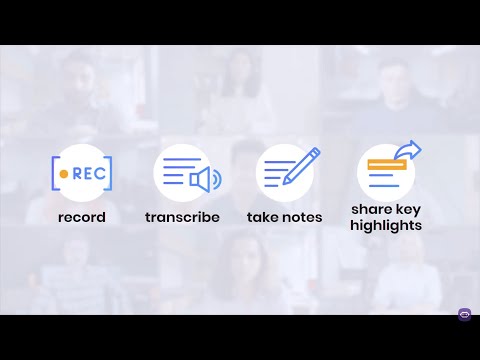
MeetGeek takes the hassle out of meeting documentation by automatically video recording and transcribing meetings in real-time. Whether it’s a team meeting, sales pitch, or any other type of business gathering, every word gets captured and converted into text, making it easier to review and reflect upon later.
The platform doesn’t just record; it distills. With the power of Artificial Intelligence, MeetGeek summarizes your meetings, identifying action items and highlighting important topics. The need for post-meeting notes becomes a thing of the past, thereby saving valuable time.
Offering keyword search capabilities and tailored tips, MeetGeek ensures that the crucial points of a meeting are not just identified but also implemented effectively. This feature allows for pinpoint focus on what truly matters in the meeting discussions.
With available integrations with Google Calendar, Microsoft Outlook, Zoom, Microsoft Teams, and various task management platforms, MeetGeek serves as a central hub for all your meeting needs. Moreover, its compatibility with document repositories and collaboration tools makes it an indispensable part of any team’s workflow.
Multilingual support ensures that language is never a barrier, while the feature to send meeting summaries directly to users’ inboxes keeps everyone in the loop effortlessly.
Just one click is all it takes to create highlights from longer meetings. Transform those lengthy recordings that no one actually re-watches into brief summaries, making these crucial meeting insights easily accessible and shareable with your team.
 Leave a Comment
 DenoLyrics - Outstanding Transcriber Freemium AI tool
 In a digital age filled with multimedia content, the demand for reliable audio-to-text conversion has never been higher. This review aims to examine DenoLyrics, a web application that leverages artificial intelligence to meet these evolving needs.
DenoLyrics stands out for its AI-powered capabilities. Utilizing state-of-the-art technology, the application converts audio into text with remarkable efficiency and accuracy. Its intelligent algorithms ensure a high level of precision, providing users with transcriptions they can trust.
A major highlight of DenoLyrics is its support for more than 50 languages. This opens up possibilities for a global audience, from language learners to international journalists. It allows users to engage with the tool, no matter what their linguistic background may be.
The application operates via real-time cloud processing, which translates to virtually instant audio transcription. Users no longer have to wait for lengthy processing times; their transcriptions are ready almost immediately.
Data security is a top priority for DenoLyrics. It not only ensures the safety of user data but also offers secure payment options, including PayPal, VISA, and Mastercard, for any future premium features or services.
Ease of access is yet another feature that can’t be overlooked. DenoLyrics is accessible directly via a web browser, eliminating the need for any installations or additional software.
DenoLyrics extends free usage to its users, offering them a cost-effective way to experience the capabilities of the tool.
Users can stay updated and engage with the DenoLyrics community through its presence on popular social media platforms like Facebook, Instagram, Twitter, and GitHub.
DenoLyrics is not just a tool but a versatile platform that can be beneficial across a plethora of domains. From content creators and podcasters to professionals in the legal, medical, or education fields, the applications are endless. Even individuals with hearing impairments can significantly benefit from its features, making it an inclusive tool for all.
Leave a Comment
 Ermine - Outstanding Transcriber Free AI tool
 In today’s digitally connected world, the need for quick and secure audio-to-text transcription is more prevalent than ever. This formal review serves to examine Ermine.ai, an innovative AI-powered tool designed to meet these modern-day transcription demands.
One of the most defining features of Ermine.ai is its 100% local/client-side processing. Unlike conventional transcription tools, Ermine.ai performs all transcription tasks directly on the user’s device. This ensures that audio data remains private and secure, eliminating the need to transmit sensitive recordings to external servers.
Ermine.ai goes a step further by providing users with the option to download both the audio file and transcript. This feature is particularly useful for individuals who may require the transcribed data for future reference or further analysis.
In the age of immediate gratification, fast and efficient transcription is not just a luxury but a necessity. Ermine.ai is designed to provide quick and accurate transcriptions, making it a stellar time-saving solution for audio-to-text conversion tasks.
With its straightforward user-friendly interface, Ermine.ai allows users to initiate the transcription process with relative ease. Before starting, users need to download the tool from GitHub and may experience a slight initial loading time to cache the transcription model.
There are a few aspects users should consider:
- The tool must be downloaded from GitHub.
- Initial use may take a few minutes to load the transcription model, approximately 50MB in size.
- Currently, Ermine.ai supports English transcription only.
- Users may be prompted to grant microphone access to initiate the transcription process.
Leave a Comment
 Transkribieren - Outstanding Transcriber Freemium AI tool
 In the realm of audio-to-text transcription services, Transkribieren stands as a beacon of efficiency and accuracy. This formal review aims to elucidate the array of features and functionalities that make Transkribieren an indispensable tool for multiple sectors.
Transkribieren is not just another transcription tool; it’s a comprehensive solution equipped with features that cater to specific user requirements. Offering support for various audio file formats such as mp3, mp4, mpeg, mpga, m4a, wav, and webm, this tool has a wide-reaching applicability. Coupled with fast and precise AI-driven transcription, the tool offers an ease of use that is both refreshing and essential.
In the fast-paced world of technology, staying static is not an option. Transkribieren understands this, offering regular updates to enhance functionality and performance, ensuring that users always have access to the best features.
The tool’s versatility is reflected in its wide industry applicability, making it a go-to option for sectors like legal, medical, and research. From legal transcriptions of court proceedings and depositions to medical transcriptions of doctor-patient consultations, as well as research interviews and focus group discussions, Transkribieren offers unparalleled service.
Whether you need to convert a podcast, an interview, or any general audio content into text, Transkribieren serves as a one-stop solution for all your transcription needs, providing excellent text output for documentation, analysis, or accessibility purposes.
Leave a Comment
 Sonix - Outstanding Transcriber Paid AI tool
 In a world where timely and accurate information is paramount, Sonix emerges as the ultimate solution for automated transcription and translation. This formal review aims to highlight the state-of-the-art features and unparalleled versatility of Sonix.
Sonix is not merely a transcription service; it is an all-encompassing platform for content creators, professionals, and institutions. Highly accurate and extraordinarily fast, Sonix provides automated transcription in 38+ languages. Features such as word-by-word timestamps, speaker labeling, automated diarization, and a plethora of text export options make Sonix stand out.
Sonix’s advanced automated translation engine is not limited to transcription. Users can translate their transcripts in minutes across 40+ languages, ensuring global reach and making the tool highly versatile.
Make your videos not just accessible but also searchable and more engaging. Sonix offers the flexibility to customize and fine-tune your transcripts and subtitles, adding another layer of perfection to your content.
Sonix supports comprehensive multi-user permissions, allowing you to easily collaborate by granting different levels of access for uploading, commenting, editing, and restricting files or folders. Moreover, multi-folder nesting helps you stay organized effortlessly.
In terms of security, Sonix is committed to safeguarding your data through multiple layers of protection. Be it personal or professional information, your data remains secure and private.
Whether it’s a web conferencing system like Zoom or a video editing platform like Adobe Premiere, Sonix offers seamless integration, allowing you to get the most out of the tools your team already uses.
Leave a Comment

 Copy.ai - Outstanding Copywriting Freemium AI tool
 The game of content creation has been redefined with Copy.ai, an AI-powered content generator designed to supercharge your copywriting efforts. This formal review outlines the multitude of features that make Copy.ai a must-have tool for anyone serious about generating high-quality, engaging content.
With an astonishing array of over 90 tools and templates, Copy.ai isn’t just another content generator. Whether you’re a blog writer, social media manager, or email marketer, this platform provides all the necessary tools to revolutionize your writing process.
Copy.ai’s capability to write in 29+ languages makes it a globally versatile tool. This multi-linguistic feature ensures you can engage audiences from different linguistic backgrounds, thereby widening your market reach.
7,000,000+ professionals and teams are already utilizing Copy.ai, a testament to its reliability and effectiveness. With a free account offering 2,000 free words per month, it’s an accessible platform for those who are hesitant to commit initially.
- Blog Content: Transform the way you write blogs.
- Sales Copy: Boost your sales with compelling copy.
- Digital Ad Copy: Create effective digital advertising.
- Social Media Content: Elevate your social media game.
- eCommerce Copy: Make your product listings irresistible.
- Website Copy: Enhance your website’s overall impact.
Users consistently praise Copy.ai for its ease of use, time-saving capabilities, and high-quality content generation. Special mentions often go to the “First Draft Wizard” and the Freestyle tool, both hailed as game-changers in the content creation landscape.
Enter your project details, provide some context about your brand, sift through the AI-generated results, and voila! Edit, polish, and publish using Copy.ai’s intuitive editor.
Leave a Comment

 Craftly.ai - Outstanding General Writing Paid AI tool
 Craftly.AI is not just another copywriting tool; it’s a full-fledged content generator that ushers in a new era of AI-powered writing. This formal review aims to illuminate the high-caliber features and numerous advantages of using Craftly.AI for diverse content creation needs.
Boasting over 10,000 hours of expert content training, Craftly.AI has a sophisticated understanding of tone, audience, and language. This isn’t just another robotic AI; it’s a highly-trained machine that captures the nuances of human language.
Craftly.AI’s multilingual capabilities cannot be overstated. With support for over 25 languages, the software is well-equipped to meet the needs of a global audience, expanding your reach like never before.
With its analytics and versioning features, Craftly.AI serves as a dynamic space where teams can collaborate effortlessly. Track your progress and manage your team under one intuitive platform.
The custom tools and tailored resources offered by Craftly.AI are invaluable. No more one-size-fits-all approaches; create the exact copy that you envisioned.
- Businesses and eCommerce Websites: Improve written content for higher conversions and engagement.
- Charities, Influencers, Artists, Musicians, and Creators: Elevate the quality of writing and maximize audience engagement.
Say goodbye to repetitive, robotic AI content. Craftly.AI offers Custom LLMs for original, high-converting content that genuinely resonates. Tell the tool what you want to write about, and it becomes a catalyst for your creative flow.
Leave a Comment
 AiContentzy - Outstanding Copywriting Freemium AI tool
 The era of labor-intensive content creation is over, thanks to aiContentzy. This formal review delves into the various aspects that make aiContentzy a game-changing tool for businesses and individuals. By leveraging artificial intelligence, the software offers a streamlined, efficient, and personalized approach to generating content.
aiContentzy offers a library of over 50 templates for various content types. Whether you’re a business looking to draft engaging blog posts or an individual aiming for persuasive social media captions, there’s a template designed to meet your needs.
This feature allows users to provide specific instructions for personalized content generation. Tailoring your content according to detailed input ensures that the end result is not just high-quality but also perfectly aligned with your specific needs and requirements.
Users receive ready-to-publish content of exceptional quality, effectively removing the hassle and time drain of revisions and edits. This is AI-powered content creation at its finest.
In the age of social media, visuals matter. aiContentzy’s image generation feature creates engaging images that complement the textual content, thereby boosting engagement across platforms.
- Businesses: Streamline content creation, saving both time and resources.
- Individuals: Generate high-quality, tailored content without the manual grind.
aiContentzy offers a convenient and cost-effective solution for those seeking to navigate the labyrinthine process of content creation with ease and efficacy.
Leave a Comment
 Noty.ai - Outstanding Productivity Free Trial AI tool
 The transformation of Google Meet into a fulcrum for actionable tasks, meticulous follow-ups, and clear-cut projects is achieved astutely by Noty.ai. This meeting transcription software comes equipped with AI-powered technology to keep users fully engrossed in conversations while automating the mundane aspects. This formal review delineates the robust features, versatile applications, and compelling use-cases that make Noty.ai a versatile tool for professionals across various domains.
Noty.ai’s real-time transcription service not only facilitates easy note-taking but also paves the way for effortless drafting of follow-ups. This feature ensures that no crucial information slips through the cracks, thereby serving as a reliable assistant during meetings.
With its applications spanning across project management, sales, engineering teams, HR, and UX/UI research, Noty.ai has proven to be a multi-faceted solution. It is perfectly aligned to serve the unique requirements of each professional niche.
The software seamlessly integrates with Google Meet, Google Docs, Google Calendar, and even Zoom, thereby functioning as an effortless extension of your existing workflow and digital ecosystem.
- Project Managers: Enhance meeting productivity and documentation.
- Sales and HR Professionals: Capture vital details during discovery and recruitment calls.
- Engineering and Product Teams: Streamline communication and follow-ups for efficient project execution.
With free options that provide 2 hours daily for meeting follow-ups, summaries, and tasks, Noty.ai offers a cost-effective and time-saving solution. Let the Noty Workplace AI Assistant handle the heavy lifting, so you can focus on what really matters.
Leave a Comment
 Cogram - Outstanding Productivity Contact for Pricing AI tool
 In today’s fast-paced corporate environment, virtual meetings have become the backbone of collaboration and decision-making. Cogram emerges as a solution tailored to enhance the productivity of these interactions. This AI-driven tool is ingeniously designed to automate meeting transcriptions, speed up setup, integrate seamlessly with existing CRMs, and prioritize user privacy. This review seeks to elucidate the impactful features and broad use-cases that make Cogram an indispensable asset for professionals.
Cogram excels in offering real-time transcription services that go beyond mere record-keeping. It analyzes meetings to generate succinct summaries and identify action items. This automation eradicates the need for manual note-taking and ensures that key points are not lost in translation.
One of Cogram’s standout features is its lightning-fast setup. With quick and easy implementation, users can make immediate use of the software’s capabilities without getting bogged down in complex installations and setups.
Another significant advantage lies in its seamless integration with CRMs and enterprise security systems. This enables Cogram to fit effortlessly into existing workflows, thereby amplifying its usability across different platforms.
Cogram takes privacy seriously, and users will appreciate that the software does not store any audio or video recordings, thereby providing an extra layer of data security.
- Sales and Customer Success: Leverage Cogram to heighten meeting efficiency and bolster follow-up actions.
- Project Management: Utilize Cogram to simplify internal communication and task assignments.
- Internal Meetings: Adopt Cogram to elevate productivity and organizational prowess within your team.
Leave a Comment
 Meet Summary - Outstanding Summarizer Free Trial AI tool
 In a corporate landscape where meetings are the crucible of decision-making, Meet Summary stands out as an innovative solution designed to optimize meeting outcomes. This AI-powered tool aims to bolster team productivity by automating the generation of accurate and consistent meeting summaries and action items. This review delves into the key features and potential use-cases that position Meet Summary as a pivotal asset for modern businesses.
Meet Summary excels in automatically generating meeting summaries that are both accurate and consistent. This eliminates the cumbersome task of manual note-taking and ensures that the team can revisit salient points and decisions long after the meeting has ended.
The tool is especially noteworthy for its action item tracking feature, which identifies and highlights tasks that require follow-up. This elevates accountability and makes sure that agreed-upon actions are promptly executed.
Not to be overlooked is Meet Summary’s user-friendliness, requiring only three simple steps to generate a comprehensive meeting summary. This makes the tool accessible even for those who may not be tech-savvy.
Security-conscious users will find solace in the fact that Meet Summary does not store any meeting recordings or summaries, thereby maintaining the confidentiality and integrity of sensitive information.
- Efficient Meeting Management: Utilize Meet Summary for time-efficient, precise summarization and tracking of action items.
- Enhanced Collaboration: Share meticulously generated summaries with team members to foster alignment and accountability.
- Improved Focus and Engagement: Free yourself from the distraction of note-taking, allowing for full engagement and active participation in meetings.
Leave a Comment
 Grain - Outstanding Summarizer Freemium AI tool
 In an age where data is the new currency, Grain emerges as a game-changer in capturing and capitalizing on customer conversations. This AI-powered tool streamlines the note-taking process during customer meetings, allowing teams to focus on what truly matters: the customer. This review offers an in-depth look at the features and benefits that make Grain an indispensable asset for any customer-focused team.
Grain excels in providing AI-assisted summaries that highlight the crucial moments from customer meetings. Not only does this eliminate the tedious process of manual note-taking, but it also ensures that the significant points are captured effectively and can be revisited for actionable insights.
Beyond just meetings, Grain offers comprehensive note-taking capabilities for research interviews, sales calls, and other customer interactions. Its versatility extends the sphere of its applicability, making it a robust tool for multiple operational contexts.
One of the standout advantages of Grain is the time-saving benefit it provides. By automating the note-taking process, it allows you to be fully present during conversations with customers, thereby enhancing the quality of interactions and, ultimately, customer satisfaction.
Grain has native integrations with platforms like Slack, Salesforce, and Notion, making sharing a breeze. Whether it’s to improve team collaboration or to increase customer advocacy, the insights captured can be effortlessly shared across various platforms.
- Improve Team Collaboration: Use Grain to capture and share insights, thereby promoting better team understanding and collaboration.
- Enhance Customer Advocacy: Grain’s accurate, AI-generated summaries can serve as a powerful tool for customer advocacy initiatives.
- Increase Productivity: Let Grain take care of the note-taking while you concentrate on meaningful customer interactions.
Leave a Comment
 Tactiq - Outstanding Summarizer Freemium AI tool
 In the rapidly evolving digital workplace, the ability to conduct efficient and effective meetings is more important than ever. Enter Tactiq, an AI-powered transcription tool that seamlessly integrates with Zoom, Google Meet, and MS Teams to transform your meeting management experience. This review delves into the key features and benefits of Tactiq, highlighting how it stands as an indispensable tool for modern professionals.
Tactiq has the unique advantage of automatic integration. As soon as a new meeting starts in Zoom, Google Meet, or MS Teams, Tactiq appears, ready to assist you in capturing the key moments and discussions.
Leveraging OpenAI’s advanced ChatGPT technology, Tactiq generates comprehensive meeting summaries, action items, and even drafts the next meeting’s agenda. This AI-powered feature revolutionizes the way meeting insights are captured and shared.
One of the standout features of Tactiq is its bot-free environment. Users can experience the benefits of AI capabilities without the interruption or intrusion of bots during their meetings, making for a more natural conversational flow.
Instant sharing is made easy with Tactiq. The full transcript, summary, and even standout quotes can be quickly shared with your team through your favorite tools, reinforcing clear and efficient communication.
- Efficient Meeting Management: Tactiq helps you record discussions, decisions, and action items, ensuring nothing important is missed.
- Clear Communication: Easily share precise summaries and transcripts to keep everyone in the loop.
- Time-saving Solution: Minimize the manual effort of note-taking and summarization, freeing you to focus on more strategic tasks.
Leave a Comment
 Jamie - Outstanding Summarizer Free AI tool
 In an era where effective communication is crucial for success, Jamie sets a new standard for capturing the essence of meetings in high-quality summaries. This formal review aims to elaborate on the diverse features and applications of Jamie, an AI assistant that is redefining how meeting summaries are created and shared.
Jamie is engineered to generate high-quality meeting summaries within mere seconds. This feature is particularly beneficial for professionals who are constantly on the move and need immediate, accurate meeting records.
The ability to extract critical data from meeting audio across various software platforms offers users unparalleled flexibility. No longer are you constrained by the meeting software in use; Jamie ensures that the essential points are captured every time.
One of Jamie’s most unique offerings is the ability to generate summaries based on key insights discussed during the meeting. This research-based approach ensures that your summaries are not just descriptive, but also insightful.
With data hosting in Frankfurt, Germany, Jamie provides an extra layer of security. Users can be assured that their sensitive information is handled with the utmost care.
With support for over 15 languages, Jamie is an excellent fit for multi-lingual teams and organizations. Language is no longer a barrier to capturing accurate and useful meeting summaries.
Jamie offers the ability to adjust the level of detail in your summaries, allowing them to meet specific requirements. Whether it’s a high-level overview or a detailed account, Jamie has got you covered.
The ease of distributing summaries to relevant participants aids in seamless communication and enhanced collaboration within teams and organizations.
With Jamie, stay fully engaged in meetings without the burden of note-taking, ensuring you can contribute meaningfully to discussions while capturing the essentials effortlessly.
Leave a Comment
 Whisper API - Outstanding Transcriber Paid AI tool
 In today’s digital ecosystem, where audio data plays a pivotal role, Whisper API stands out as a game-changing solution for AI-powered transcription needs. This formal review takes an in-depth look at the multitude of features and benefits offered by Whisper API, a robust tool that leverages OpenAI’s Whisper model to provide precise and reliable transcriptions.
Built on the robust foundation of OpenAI’s Whisper model, Whisper API delivers highly accurate and reliable transcriptions. It enables users to confidently turn audio data into text, significantly enhancing the value of audio content across various industries.
With support for an array of audio formats, including WAV and MP3, Whisper API ensures seamless integration and compatibility with most audio sources. This versatility simplifies the transcription process, removing the barriers typically associated with audio format limitations.
For environments with multiple speakers, Whisper API offers a diarization feature that segments speakers for enhanced transcription accuracy. This is particularly beneficial in scenarios like conference calls, panel discussions, and multi-participant interviews.
With cost-effective pricing at $0.15 per hour of audio, Whisper API stands out as one of the most affordable transcription APIs on the market. Budget-conscious users need not compromise on quality or reliability.
Whisper API offers a simple sign-up process with email or Gmail accounts, enabling users to generate secure API keys linked to their accounts effortlessly. This feature adds an additional layer of convenience and security.
Payments are managed through Stripe, providing users with a secure and user-friendly platform for payment processing. Users can easily access billing history and manage payments, ensuring transparency and trust.
Whether it’s transcription platforms, voice assistants, chatbots, content creators, or researchers, Whisper API serves a multitude of needs across various sectors.
Leave a Comment
Loading... Adobe Enhance Speech - Outstanding Audio Editing Free AI tool
 In a competitive landscape where audio quality can make or break content, Adobe Enhance Speech emerges as a forerunner in AI-driven audio optimization. This formal review meticulously delves into the multi-faceted capabilities of Adobe Enhance Speech, revealing how it reshapes spoken audio into studio-quality recordings.
Noise can be a detrimental factor in any audio project, but Adobe Enhance Speech offers a formidable solution. Utilizing AI-powered algorithms, it effortlessly eliminates background noise, reverberations, and distortions, rendering each spoken word in studio-like clarity.
Adobe Enhance Speech goes beyond simple noise reduction. Its automatic adjustments optimize volume, pitch, and frequency levels, assuring that the desired sound quality is not only achieved but consistently maintained.
Sometimes, standard audio just isn’t enough. Adobe Enhance Speech allows for the addition of audio effects such as reverb and echo, offering a customizable audio output that adds depth and dimension to any project.
Inconsistencies like mispronunciations and stutters can detract from an otherwise polished audio piece. Adobe Enhance Speech uses AI to detect and eliminate such errors, ensuring a smooth and professional final product.
Whether it’s podcasters seeking pristine audio, video editors aiming to enhance their projects, or professionals requiring crystal-clear conference calls and webinars, Adobe Enhance Speech caters to a wide range of applications.
For users who are hesitant to invest immediately, Adobe Enhance Speech provides the opportunity to clean up audio for free through its Adobe Podcast AI feature. A trial run that promises not to disappoint.
Leave a Comment
 Nonoisy - Outstanding Audio Editing Freemium AI tool
 In an era where high-quality audio can differentiate success from mediocrity, Nonoisy positions itself as a pioneer in AI-driven audio post-production editing. This formal review illuminates the diverse features and functionalities of Nonoisy, emphasizing its utility in optimizing audio for a plethora of applications.
Noise pollution can severely degrade the quality of any audio recording. Nonoisy uses cutting-edge algorithms and artificial intelligence to surgically remove background noise, offering a clean slate for auditory perfection.
Audio quality isn’t just about what you don’t hear; it’s also about enhancing what you do hear. Nonoisy provides advanced audio mastering techniques that fine-tune the balance and clarity of the sound, uplifting the audio from satisfactory to professional.
Unpredictable volume levels can be a disruptive listener experience. Nonoisy intelligently adjusts the volume across the audio file, creating a consistent auditory environment from start to finish.
Nonoisy breaks down language barriers, its AI algorithms are language-independent. This unique feature enables it to work effectively with audio content in any language, expanding its usefulness across global platforms.
Minute audio artifacts like clicks and pops can be as disruptive as loud noises. Nonoisy eliminates these distracting elements, ensuring that the listening experience remains smooth and enjoyable.
From podcasters to video creators, from audiobook producers to amateur audio editors, Nonoisy offers something for everyone. Its features are meticulously designed to meet the diverse audio editing requirements for a broad spectrum of projects.
Time is money, and Nonoisy saves both. The AI-driven automation makes it a cost-effective and time-efficient alternative to hiring professional audio editors.
To ensure that users get a taste of its capabilities, Nonoisy offers a free trial along with additional resources related to podcasting and video editing.
Leave a Comment
 Cleanvoice AI - Outstanding Audio Editing Free Trial AI tool
 In a world increasingly dominated by digital content, audio quality can make or break the success of podcasts, voice-over projects, and other audio-based mediums. Cleanvoice AI emerges as a groundbreaking tool designed to address the prevalent issues of filler words, mouth sounds, and dead air that often plague recordings. This review highlights the tool’s features, showcasing how it serves as an invaluable asset for enhancing audio quality.
Cleanvoice AI breaks language barriers by offering multilingual support. The AI can discern and eliminate filler sounds in various languages and accents, making it an essential tool for global content creators.
The tool goes beyond just removing filler words and stutters. It also eliminates distracting sounds such as lip-smacking and clicking, ensuring that your audio recordings are as crisp and clean as possible.
For those who desire greater control over the editing process, Cleanvoice AI provides a timeline export feature. This enables users to visualize suggested edits, allowing for a more streamlined and efficient editing process.
Whether you’re a podcaster, a voice-over artist, or a content creator looking to improve audio across multiple languages, Cleanvoice AI has got you covered. It caters to a range of audio-related needs, making it a versatile and indispensable tool.
With a free 30-minute trial and no credit card required, Cleanvoice AI allows users to test its capabilities without any commitments. This ensures that you can be confident in the value the tool brings to your audio projects before making a financial commitment.
Leave a Comment
 Gladia - Outstanding Audio Editing Freemium AI tool
 In today’s business environment, the role of audio data is undeniable. Whether it’s virtual meetings, customer calls, or interactive media, the value embedded within these sounds is immense. Gladia stands as a remarkable solution that not only transcribes but also translates and deeply analyzes audio data. This review dissects the numerous key features and benefits of Gladia, showing why it’s an indispensable tool for any business looking to extract maximum utility from their audio data.
Leveraging cutting-edge AI technology, Gladia offers highly accurate audio and video transcription. What sets it apart is its capability for speaker diarization, distinguishing between multiple speakers for a more organized and insightful transcript.
Going beyond mere transcription, Gladia’s Audio Intelligence API captures and enriches hidden insights within audio data. This allows for a multi-dimensional analysis, transcription, translation, and data security all within a single platform.
Gladia features an expansive library of audio intelligence add-ons, such as word-level timestamp, sentiment analysis, and summarization. These tools add layers of insight and utility to every transcript.
The API is crafted for universal compatibility. Whether you’re an experienced developer or a novice, the API integrates with all tech stacks, requiring no prior AI expertise.
Gladia assures the safety of all data, complying fully with stringent EU and US privacy regulations. Businesses can be confident that their information is securely handled.
With pay-as-you-go scalability, Gladia evolves in tandem with your business. As your data needs grow, Gladia scales effortlessly to meet those demands.
Whether you’re operating in the sphere of virtual meetings, workspace collaboration, content and media, or call centers, Gladia serves as a versatile tool for generating insight-based call transcripts, thereby enhancing customer experience and compliance.
Leave a Comment
 Macwhisper - Outstanding Transcriber Freemium AI tool
 In an increasingly digitized world, transcription remains an essential task that benefits numerous sectors such as media, education, and business. MacWhisper emerges as a beacon of innovation in this landscape, engineered by OpenAI exclusively for Mac users. This formal review offers an in-depth look into the groundbreaking features and expansive use-cases that make MacWhisper a veritable game-changer in the transcription technology sector.
With a user-friendly interface, MacWhisper allows for the effortless transcription of audio files into text. Users can conveniently drag and drop audio files, initiating a process that transforms audio into accurate text within seconds.
This technology stands out for its support for a wide array of audio file formats including MP3, WAV, M4A, and even MP4 videos. This wide-ranging compatibility renders it a highly versatile tool suitable for diverse transcription needs.
MacWhisper supports transcription in over 100 languages, making it an indispensable tool for multi-lingual users or those looking to transcend language barriers.
The Reader Mode feature allows for comprehensive editing capabilities, enabling users to delete or edit segments, search for specific words, and highlight text, thereby personalizing each transcript to their individual needs.
For those in pursuit of the utmost accuracy and functionality, the Pro version of MacWhisper offers a plethora of enhancements including Monterey Support, translation features, auto-updating capabilities, custom models, and podcast transcription.
Whether you are in need of transcribing meetings, interviews, podcast episodes, or even generating text for content creation like blog posts and articles, MacWhisper proves itself as an all-encompassing transcription solution.
Leave a Comment
 SpeechText.AI - Outstanding Transcriber Free Trial AI tool
 In a world where audio and video content is increasingly prevalent, the ability to transcribe this content swiftly and accurately is indispensable. SpeechText.AI, a powerful speech-to-text application, fills this gap effectively. This formal review will illuminate the key features and varied use-cases that establish SpeechText.AI as a must-have tool for any individual or business involved in audio and video transcription.
SpeechText.AI offers an intuitive platform where all a user needs to do is upload the desired file. The app swiftly converts audio and video content into text and subtitles, making it extremely convenient for those who require quick transcriptions.
Leveraging advanced speech recognition technology, the app boasts a human level of transcription accuracy. Whether the content involves simple conversation or complex terminology, SpeechText.AI ensures highly accurate transcriptions.
Time is often the most significant constraint when transcribing audio and video files. SpeechText.AI addresses this pain point by automating the transcription process, freeing users to concentrate on other important tasks.
With the ability to support more than 30 languages and non-native accents, this service is ideal for international use-cases.
Unique to SpeechText.AI is its capability to detect individual speakers in multi-participant conversations, attributing the transcribed text to the respective individuals. This feature is particularly useful in interviews, podcasts, and webinars.
Whether it’s transcribing interviews, creating subtitles for videos, or generating text from lectures and speeches, SpeechText.AI covers a broad spectrum of audio and video transcription needs.
With plans starting at just $10 per month and a free trial available, SpeechText.AI has garnered recommendations from various reputable sources, making it a trusted and budget-friendly option.
 Leave a Comment
 EchoFox - Outstanding Productivity Paid AI tool
 In a digital landscape replete with audio content, the need for accurate and efficient transcription services has never been greater. EchoFox emerges as a forerunner in this domain, offering an AI-powered solution designed to convert voice memos into text with remarkable accuracy and speed. This formal review will delve into the distinctive features and various use-cases that make EchoFox a must-have tool for both individuals and businesses.
Always available, EchoFox stands ready to convert your audio messages into text whenever you need it. Its round-the-clock availability ensures that users can focus on what matters most to them, thereby optimizing their productivity.
EchoFox is compatible with a wide array of audio formats, including ogg, mp3, and wav. This multifaceted support guarantees that users have the flexibility to work with various types of audio files.
With the capability to transcribe in up to 98 languages, EchoFox truly has a global reach. However, it is specially optimized for English, Spanish, German, French, Portuguese, and Italian, making it a highly versatile tool.
Leveraging cutting-edge noise reduction technology, EchoFox ensures accurate transcriptions even in noisy environments. This feature is particularly useful for users who find themselves in less-than-ideal recording conditions.
EchoFox integrates seamlessly with popular apps like Facebook Messenger, Instagram, and Telegram. This added convenience allows users to easily share or archive their transcriptions within these platforms.
Security-conscious users can rest easy knowing that EchoFox adheres to industry-standard data retention and deletion policies, thereby ensuring a safe and compliant user experience.
Whether it’s rapidly converting voice memos to text, adapting to various audio formats, functioning in noisy environments, or integrating with popular apps, EchoFox meets these needs proficiently while ensuring data security.
Leave a Comment
 Hackercast - Outstanding Summarizer Free AI tool
 In today’s fast-paced world, staying updated on the latest tech news is vital but time-consuming. Hackercast stands out as an innovative solution that marries cutting-edge AI technology with podcasting to bring Hacker News closer to individuals who may not have the time for long reads. This formal review explores the revolutionary features and use-cases that set Hackercast apart as a tool for the modern tech enthusiast.
Utilizing Langchain and GPT-4, Hackercast scrapes the Hacker Newsletter to generate concise and relevant summaries of articles. It’s not just a rehash; it’s an intelligent distillation of the most vital information, optimized for quick consumption.
Transforming these summaries into an audio podcast format using AWS Polly, Hackercast presents an alternative, hands-free way of keeping up-to-date with the tech world. Now, users can listen to summaries of the most compelling articles while multitasking or during their commute.
One of Hackercast’s core strengths lies in its efficiency. For those who are short on time but still want to stay in the loop, the platform serves as a quick and easy way to catch up on Hacker News without diving into lengthy articles.
The creator of Hackercast welcomes user feedback and suggestions, ensuring that the tool’s functionality is continually refined and enhanced to meet the evolving needs of its audience.
Whether you aim to stay updated on Hacker News in a time-efficient manner, desire audio summaries for on-the-go consumption, or simply want to catch up on tech news without the commitment of reading extensive articles, Hackercast fulfills these needs adeptly.
Leave a Comment

 The GodChat - Outstanding Education Assistant Free Trial AI tool
 As we navigate an increasingly digital world, GodChat emerges as a game-changer in personal assistant technology. Designed to provide exceptional services, GodChat integrates with WhatsApp to offer AI chat services powered by GPT3.5 and GPT4, moving well beyond the capabilities of traditional responsive bots. This review delves into the innovative features and practical use-cases that make GodChat an indispensable tool for modern life.
GodChat employs cutting-edge AI technologies GPT3.5 and GPT4 to facilitate enhanced communication. The chat services are far more than mere programmed responses; they are dynamic, contextual, and adapt to the nuances of human conversation.
Perhaps one of its most compelling features is its seamless integration with WhatsApp, one of the world’s most popular messaging platforms. This synergy allows for uninterrupted and smooth communication without having to switch between different applications.
GodChat isn’t just about text. The platform also possesses the capability to generate multimedia content, ranging from audios and images to documents. This versatility makes GodChat a powerhouse for content creation, all accessible within the WhatsApp interface.
GodChat’s applications are multi-faceted. From serving as a next-level personal assistant on your smartphone to facilitating smooth AI-powered chats within WhatsApp, the platform offers practical solutions for the contemporary user. The added ability to generate multimedia content further broadens its utility.
Leave a Comment

 HeroTalk - Outstanding Experiments Free AI tool
 In a world where technology often alienates rather than connects, HeroTalk.AI serves as a groundbreaking exception. The platform allows for direct, two-way voice conversations with an extensive range of notable personalities, both real and fictional. This review explores the myriad of features and use-cases that make HeroTalk.AI an exciting frontier in the realm of AI-human interaction.
HeroTalk.AI shines in its ability to facilitate interactive voice conversations with characters and figures that users have always dreamed of conversing with. The technology is not merely a pre-recorded set of responses but a dynamic exchange that closely mimics real conversation.
The platform does not limit itself to a niche. From historical figures to popular fictional characters, HeroTalk.AI offers a diverse lineup of notable personalities, thereby catering to a broad spectrum of interests and preferences.
One of the standout features is the authenticity of the interactions. The AI models generate responses that not only answer the user’s queries but do so in a manner that faithfully mimics the speaking styles and personalities of the chosen characters.
HeroTalk.AI is not just a tech tool; it is an entertainment powerhouse. Whether it’s discussing philosophy with Socrates or trading jokes with a beloved comic book hero, the platform offers an immersive and entertaining experience that transcends ordinary chatbots.
HeroTalk.AI goes beyond mere dialogues. Users can explore deep discussions, enjoy lighthearted banter, or find a sense of companionship. The platform thus serves not just as a source of entertainment but as a medium for exploration and emotional connection.
The potential applications for HeroTalk.AI are boundless. From entertainment and learning to emotional companionship, the platform caters to a myriad of human needs and interests. This makes it a versatile tool for both individual enjoyment and broader applications.
Leave a Comment
 Godmode - Outstanding Life Assistant Free AI tool
 In a digital era that demands rapid and reliable textual interactions, Godmode presents itself as an indispensable tool for leveraging the capabilities of the ChatGPT language model. With a graphical interface that boasts exceptional user-friendliness, Godmode transforms interactions with the AI model into a streamlined, highly customizable experience. This review will highlight the vital features and the versatile use-cases that this tool brings to the table.
Godmode goes beyond a typical text-based interface by offering a Graphical User Interface (GUI) specifically designed for interacting with the ChatGPT model. Users can not only generate text but also ask questions and receive answers, making the platform a hub of interaction and customization.
One of the tool’s strongest suits is the wide array of customization options it provides for text formatting and style. From changing fonts to adjusting text size and color, users can tailor the interface according to their personal preferences and needs.
In the digital age, data retention is crucial. Godmode ensures that your valuable conversations are never lost by providing a conversation saving and exporting feature. This way, you can review, reuse, or share the generated text at your leisure.
Whether it’s for content creation, summarization, or any other textual needs, the platform’s text generation capability comes in extraordinarily handy. You can efficiently generate meaningful and coherent text, multiplying your productivity tenfold.
The question answering feature of Godmode ensures that users can directly query the ChatGPT model and receive accurate responses. Furthermore, the platform allows for simulating conversations with a virtual assistant, adding another layer of practicality and engagement to your experience.
From interacting with the ChatGPT model for text-based conversations to automating text-based interactions for businesses, the use-cases for Godmode are virtually limitless. It serves individuals who require a personalized experience, as well as businesses that need to automate text-based interactions.
Leave a Comment
Loading... Transcribethis.io - Outstanding Transcriber Paid AI tool
 In the fast-paced modern world, the need for accurate and efficient audio-to-text conversion has never been greater. Here lies the value of TranscribeThis.io, a highly accurate, AI-powered transcription solution that serves various use-cases for both personal and business endeavors. This comprehensive review will delve into its core features and potential applications.
With AI algorithms driving its core engine, TranscribeThis.io provides a level of accuracy and precision that sets it apart from conventional transcription services. The technology it employs ensures that you get high-quality transcriptions, thereby saving time and reducing errors in the process.
One of the standout features of TranscribeThis.io is its ability to accept various audio file formats. Whether you have interviews, conference calls, podcasts, or lectures to transcribe, this tool accommodates them all. Moreover, it also supports content in multiple languages, widening its reach and usability.
In addition to comprehensive transcriptions, TranscribeThis.io offers free summaries of transcripts, providing users with quick overviews of important content highlights. This feature allows for efficient consumption and review of the transcribed material.
Once the transcription is complete, users can easily download and utilize the generated text for various applications—be it for documentation, research, or content creation.
TranscribeThis.io offers subscription plans that allow transcribing up to 1,000 or 5,000 minutes of audio content. This flexibility ensures that you only pay for what you need, making it a cost-effective choice for diverse requirements.
Whether you are in the realm of academia, journalism, research, or business, the applications are myriad. Be it transcribing interviews, creating written content from audio recordings, conducting research, or archiving important audio information, TranscribeThis.io is the reliable tool you need.
Leave a Comment

 Article.Audio - Outstanding Text to Speech Freemium AI tool
 In a world increasingly defined by multimedia consumption, Article.Audio emerges as a game-changer. This robust tool converts articles into high-quality audio content, thereby redefining the way one interacts with written material. Here’s an in-depth review of its salient features and functionalities.
In its commitment to inclusivity, Article.Audio supports over 140 languages for audio conversion. This makes it a vital tool for educators, students, and content creators who cater to a multilingual audience. The platform’s unparalleled language support ensures accurate and comprehensive audio conversion, irrespective of the language of the original text.
One of the standout features is its array of human-like voices that make the listening experience remarkably pleasant. Users have the freedom to choose from various voice options, ensuring that the content is not just heard but genuinely enjoyed.
With Article Audio Pro, users can unlock a plethora of advanced features that transcend the conventional boundaries of text-to-audio conversion. This includes the capability to convert web links, text documents, PDFs, and even photos into audio format, further enhancing the utility of this versatile tool.
Whether you are a content creator keen on transforming written work into engaging audio formats, an educator looking for accessible learning materials, or a multilingual individual wanting to consume content in your preferred language, Article.Audio is the go-to solution. It serves a diverse range of needs, making content accessible and enjoyable for everyone involved.
Leave a Comment

 Clippah - Outstanding Video Editing Freemium AI tool
 For those who understand that quality content can be both a journey and a destination, Clippah arrives as an indispensable companion. This AI-powered video editing tool has been meticulously designed to accelerate and enrich the video content creation process. Below is a comprehensive review of why Clippah is turning heads in the digital content creation landscape.
Clippah’s Caption TikTok feature is nothing short of a miracle for social media enthusiasts. It automatically converts short video clips into vertical videos accompanied by captions. This not only enriches the visual appeal but also enhances audience engagement manifold.
The Reels feature extracts potent moments from videos, turning them into highly shareable and engaging clips. This is not mere truncation; this is the extraction of conversations destined to go viral, giving users a unique edge over their content competitors.
When it comes to long-form content, viewers need an easier way to navigate. Clippah offers a Timestamp YouTube Video feature, which quickly and efficiently generates timestamps. This makes the content not only user-friendly but also improves overall video engagement.
A complicated interface can often be the downfall of even the most promising editing tools. Clippah, however, shines in its simplicity and user-friendliness, not forgetting to offer a free trial during its beta phase. A welcoming move for those testing the waters.
Whether you are a social media influencer, a YouTuber, or a business, Clippah is your go-to tool for creating compelling videos. Its diverse features are ideally suited to various types of content creators, meeting unique needs across the board.
Leave a Comment


 Adobe Podcast

 Krisp
Krisp 

 AIChatting
 ProductBot

 Talk Ai
 Chatsimple

 Free Text To Speech Online
 Streaming Options


 FineShare FineVoice


 Audyo
Audyo 
 Podcastle


 Coqui
Coqui 
 Fliki
Fliki 
 SpeechGen
 LOVO
LOVO 
 Play.ht


 Reface AI
 Blogcast™
 AudioBot
 Podbrews
 Godcast
 Voicemaker
 Leelo
Leelo 


 My Virtual Media
 Clips AI
 SocialBee
 Instantgen AI
 Alicent

 QuickVid.Ai
 Nara
Nara 
 ClipMaker
 Focia
Focia 
 Notey.AI
 Buffer


 GPT-trainer
 Prisms AI
 AI Bot
 GPTAgent
 Outset.ai
 Swell AI

 Kili
Kili 
 Invicta AI
 DapperGPT
 Avian ChatGPT Plugin


 Getimg.ai
 Fantasy.ai
 Thinkdiffusion
 Stable Diffusion
 Gretel.ai
 AI Input
 SmartflowAI
 Artificial Art
 Magic Brush AI
 ImageCreator


 Podcast Marketing AI
 Castmagic
 Texo
Texo 
 Listener.fm
 Shownotes
 Podsqueeze
 PodScribe
 VoicePen AI
 SumlyAI
 Dubb
Dubb 
 Exemplary ai


 Voicetapp
 AI Transcription by Riverside


 Dubverse


 Qlip.ai


 Superpowered


 Loopin AI

 Defog
Defog 
 Ikiblast

 AgendaAI


 Adam.ai


 Rythmex


 Easy-Peasy.AI

 Voxqube
 AskBrian.ai


 Maker ai
 Writechamp
 Cohesive
 Cowriter
 AI Magic Writer


 Monica
 Chatty
 Textreactai
 Neural Newsletters
 MagicChat AI

 Giti
Giti 
 ChatWizard


 MarketingBlocks AI


 WorkplaceAI
 Apply ML
 Augment AI


 Snipd
Snipd 

 ChatOrg

 Hints
Hints 
 Current AI


 Nüz
Nüz 

 Protection Guard

 Koolio.ai
 Artificial Studio
 Roll
Roll 

 AI Video Generator
 FolkTalk
 Vidio
Vidio 

 NarrationBox
 Ai Sofiya

 UseCloak.ai


 Wavel AI

 Audioread.com
 Pandachat


 NewsGPT
 Pod Genie


 Chat AI
 FaceFiesta.io
 Laika
Laika 


 Microsoft Bing


 StoryPear
 Novels AI
 Stellaris AI

 Fotor
Fotor 
 Fin AI bot

 Chatpad AI
 GPT3 Playground
 ConsumerAI
 AISixteen
 Grocer AI

 GPTGO
GPTGO 


 Vidyo
Vidyo 
 Shortmake
 Clip.fm
 DeepSwap
 Pictory